
QR Code Reader from Kaywa2.4.2 - Get APK
You'll be able to download in few seconds.
Publisher Description
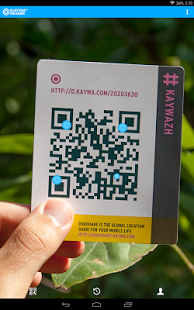
Kaywa Reader is lightning-fast and easy-to-use; it is simply the most beautiful QR Code scanner around. It is also the only one that lives by the saying , “a picture is worth a thousand words“. And amazingly it still comes totally free! No ads or banners. Check out our QR generator at http://qrcode.kaywa.com to create your own QR Codes and start scanning.
THIS IS WHAT OUR USERS ARE SAYING
★ The best q.r. reader Works great, what a great way to connect, so easy to use. I love it.
★ Amazing speed! :) Amazing speed & great design. My favorite QR reader!
★ Great! Works perfectly on my nexus. Love the feature that you can generate codes on the go
SCANNING CODES HAS NEVER BEEN EASIER
Open the Kaywa Reader, point your phone at the QR code and it will automatically detect the code. That's it! No need to login, no need to take a photo or press a „Scan“ button like with other apps, just scan and enjoy the content!
WHY WOULD I USE A QR CODE READER?
QR stands for Quick Response; QR Codes allow youto get content as easy as pointing the camera at it.
You have probably noticed printed ads with 2Dbarcodes while perusing magazines and newspapers or during shopping. Many companies now use QR codes to deliver special promotions, coupons, contest entries or videos to great content. A 2D barcode scanner is your best shopping companion, connecting you with discounts and special offers!
QR codes can do many things (for example play avideo, create a Facebook Like, scan to buy, tweet, etc), and you will always be prompted to tap to take the relevant action.
For example:
If the code encodes a web address (URL), we will redirect you to the website.
If the code encodes contact information the Kaywa Reader will show you the contact information and allow you to add that contact to your address book.
If the code encodes a text message, you will see the text message and with one click you can send it.
Kaywa not only brought QR Codes to the West in 2006, its reader was also featured by Google, Nokia, the Pet Shop Boys and TIM as their QR Code Reader of choice. Lifehacker, the New York Times, the Economist, the New York Post and many other influential blogs, websites and newspapers on the other hand have always pointed to http://qrcode.kaywa.com to generate QR Codes.
★ FEATURES ★
- Scanning all types of codes
- Light bulb button to allow scanning in dim lights
- Detecting codes automatically
- History with scan image context and geolocation
- Our QR Code Generator http://qrcode.kaywa.com to create your own qr codes for free and share them with friends.
SUPPORT & WE LOVE YOUR FEEDBACK
Our offices in Zurich, Switzerland and San Francisco, USA love to hear your feedback and Kaywa engineers worldwide are constantly optimizing the Kaywa QR Code reader to give you AWESOME.
We strive for excellence and we hope you supportus on this journey by rating us and giving us valuable feedback. If you are having any issue with our QR reader app, please let us know at support@kaywa.com.
About QR Code Reader from Kaywa
The company that develops QR Code Reader from Kaywa is Kaywa. The latest version released by its developer is 2.4.2.
To install QR Code Reader from Kaywa on your Android device, just click the green Continue To App button above to start the installation process. The app is listed on our website since 2014-06-19 and was downloaded 0 times. We have already checked if the download link is safe, however for your own protection we recommend that you scan the downloaded app with your antivirus. Your antivirus may detect the QR Code Reader from Kaywa as malware as malware if the download link to com.kaywa.barcode is broken.
How to install QR Code Reader from Kaywa on your Android device:
- Click on the Continue To App button on our website. This will redirect you to Google Play.
- Once the QR Code Reader from Kaywa is shown in the Google Play listing of your Android device, you can start its download and installation. Tap on the Install button located below the search bar and to the right of the app icon.
- A pop-up window with the permissions required by QR Code Reader from Kaywa will be shown. Click on Accept to continue the process.
- QR Code Reader from Kaywa will be downloaded onto your device, displaying a progress. Once the download completes, the installation will start and you'll get a notification after the installation is finished.
Program Details
System requirements
Download information
Pricing
Version History
version 2.4.2
posted on 2014-06-19
- Scanning inverted codes (you can enable it from settings),- Scanning Aztec and PDF 417 codes (you can enable it from settings),- Some UI tweaks on Contact Card,- Fixed some minor bugs
version 2.02
posted on 2013-07-01
Several fixes and updates
Disclaimer
External Download
We do not host QR Code Reader from Kaywa on our servers. We did not scan it for viruses, adware, spyware or other type of malware. This app is hosted by Galad and passed their terms and conditions to be listed there. We recommend caution when installing it.
The APK Download link for QR Code Reader from Kaywa is provided to you by apps112.com without any warranties, representations or guarantees of any kind, so access it at your own risk.
If you have questions regarding this particular app contact the publisher directly. For questions about the functionalities of apps112.com contact us.
